Appendix A — Overarching example
In this interactive example we will combine several topics of this class in the context of one example. For this we recall the Sea Surface temperature from Figure 13.5 and we go through the task step by step. Please code along to recreate the figures and the insights. There is almost no code provided, only some small snippets, but some content might be found elsewhere in the notes.
A.1 Download the dataset
The first step should always be to download the dataset we need. To do so, get the files from National Oceanic and Atmospheric Administration - NOAA specifically Files and here we can work with the two files sst.wkmean.1990-present.nc and lsmask.nc.
A.2 Visualizations
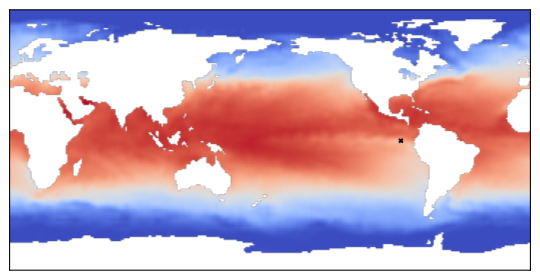
Next it is always a good idea to do some visualization for a new dataset. The same is true here. In sst.wkmean.1990-present.nc we find the timeseries, lsmask.nc gives a mask to get this properly to show only the sea and no land masses.
Exercise A.2 (Self implementation: Extract and visualize) Extract the features latitude, longitude, date and sst (sea surface temperature), as well as the mask, and do the following tasks:
- Convert the time entry to a python
DateTime, we can usenetCDF4.num2datefor it and the units can be found in the dataset. - Plot the temperature of the entry corresponding to the week containing the 21st of October 1990, with the help of the mask.
- Write a helper function to map longitude and latitude to the pixel in the picture, use it to mark the location
lat=0.5andlon=270.5, it should be on pixel(90, 270), which is in the Pacific of the cost of South America.
A.3 Get some statistics and smooth the data
Next we want to get some basic statistics for the dataset like average global sea temperatures or average temperature for a specific fixed latitude and all longitudes.
Exercise A.3 (Self implementation: Statistics) Perform the following tasks and plot the results:
- extract the entire time series for the point (
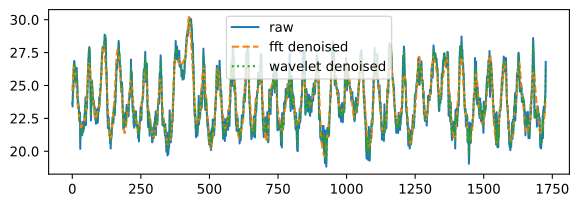
lat=0.5,lon=270.5), make plots for the following:- the time series without any modifications,
- apply
fftto the time series and try to smooth it by truncating small parts in the PSD - apply a wavelet transform to the series and try to smooth it – we can use the method
denoise_waveletfrom thescikit-imagelibrary. - get the average sea surface temperature per year.
- plot the weekly average with the minimum and maximum as an envelope
- get the average sea surface temperature on the equator (or a line close to it in the set), per year.
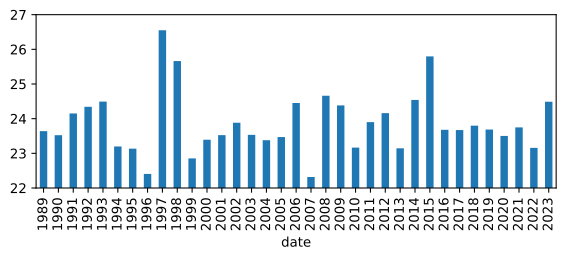
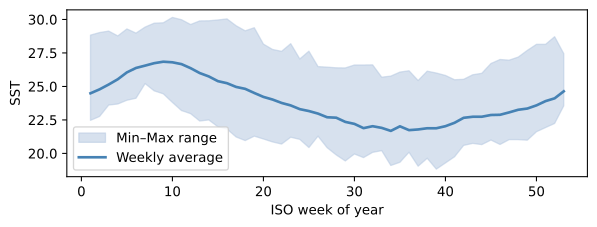
Now that we know the average sea surface temperature per year at (lat=0.5, lon=270.5), what is your best guess, when an El Niño phenomenon happened?
Hint: In the plot, find unusual high temperatures over the year.
A.4 Regression analysis for the time series
We can also apply some categorical regression to it.
Exercise A.4 (Self implementation: Categorical regression) Perform the following tasks and plot the results:
Extract the weeks from the new date (and subtract
-1to make it easier to work with indices) and store them as a vector.Create a matrix \(X\) of size
(len(ts), np.max(weeks) + n)for our regression.Fill the entries by performing the following steps:
the first \(n\) columns should be the indices of the entries scaled by
53and to the power of the column number (i.e. for \(n=4\) we get \(t^1, t^2, t^3, t^4\)).the other columns correspond to the weeks, so in row \(n\) all entries corresponding to week (\(1\) or in our case now \(0\)) should have an entry \(1\) and \(0\) otherwise.
With n = 4 we get
X[:3, :6] = array([[0.000, 0.000, 0.000, 0.000, 0.000, 0.000],
       [0.002, 0.000, 0.000, 0.000, 1.000, 0.000],
       [0.004, 0.000, 0.000, 0.000, 0.000, 1.000]])
reshape our timeseries as well as the smoothed versions into column vectors.
use the
np.linalg.lstsqalgorithm for the categorical regression and try for different values of \(n\).The longer the timeseries, the more it averages the results; try to fit it only with the first ~10 years.
Use the stochastic gradient descent method to solve the same problem; for the algorithm from these notes the following parameters work:
cc = sgd(np.random.random((xx.shape[1], 1)),
         1e-7, xx, yy, 5_000_000, 400, 1e-9)
Use a k-folds cross-validation to find the optimal choice for \(n\). You can use the following code block. What about over-fitting?
def kfold_cv(X, y, k=5, seed=6020):
    rng = np.random.default_rng(seed)
    idx = np.arange(len(y))
    rng.shuffle(idx)
    folds = np.array_split(idx, k)
    mses = []
    for i in range(k):
        val = folds[i]
        train = np.setdiff1d(idx, val)
        c = np.linalg.lstsq(X[train], y[train], rcond=None)[0]
        yhat = X[val] @ c
        mses.append(np.linalg.norm(y[val] - yhat, np.inf))
    return np.mean(mses)
For n = 0 the greatest difference is 5.151896212592957
For n = 1 the greatest difference is 4.975019660082316
For n = 2 the greatest difference is 4.9844604683515
For n = 3 the greatest difference is 4.7601519323922705
For n = 4 the greatest difference is 3.7071941060020874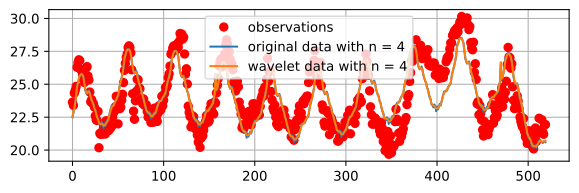
A.5 Choice for the SVD size
For the SSPQR algorithm used to compute the sensors placed in Figure 13.5 the basis consists of a SVD. We used \(25\) base nodes without giving an explanation.
Do the decomposition by hand and check for the relative mean spare error we make with different basis sizes.
Exercise A.5 (Self implementation: PCA) Perform the following tasks and plot the results:
- Compute the PCA for \(X\) where the values of \(X\) are from
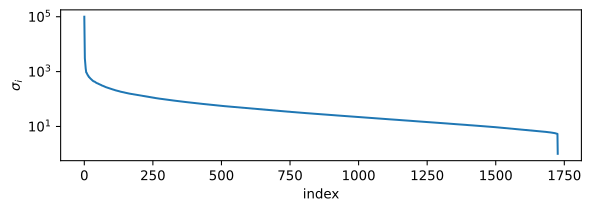
X = sst[:, masks]. - Plot the singular values in descending order of the shifted matrix \(B\).
- Compute the explained variance: \[\frac{\sigma_i^2}{n - 1}.\]
- Compute the explained variance ratio as \[\frac{\sigma_i^2}{\|\Sigma\|_2^2}.\]
- What is the combined explained variance for the first \(25\) singular values?
- Why does the final result not add up to 1?
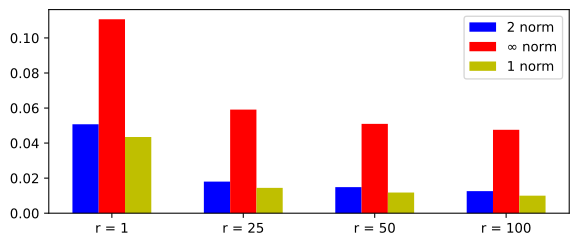
- Define the projection \[x_r = U_r U^\mathsf{T}_r x.\]
- For our entry of the cost of south america show the relative projection error with different norms.
Cumulative explained variance for the first 25 values: 0.998522937297821A.6 Bayesian update to find out how likely we can go swimming
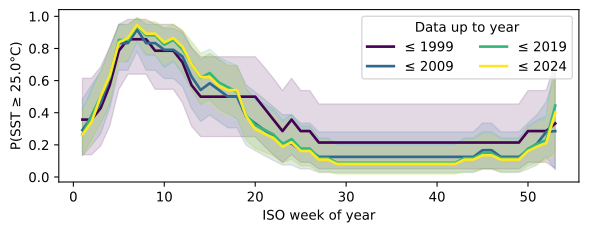
Next we try to find out how likely it is that for a given position we can go swimming in a specific week of the year, this should come in handy for the next vacation.
Exercise A.6 (Self implementation: Bayesian update) We use a Beta distribution as our prior and a Binomial likelihood, this results again in a Beta posterior and therefore an easy computation.
To get \(n\) and \(k\) for the likelihood we need to check in how many weeks a certain temperature threshold was exceeded (\(k\)) within the \(n\) weeks we have as sample size.
As a result, our Beta distribution with parameters \(\alpha_0\) and \(\beta_0\) is updated as \[ \begin{aligned} \alpha_1 &= \alpha_0 + k\\ \beta_1 &= \beta_0 + n - k. \end{aligned} \] Let us do this step by step to get an idea of how this works.
- Define a
pandasDataFramewith our example time series and the date. - Define a threshold for an acceptable swimming temperature (as we are in a warm climate, we use \(25\) in this example to see something).
- We start with \(\alpha_0 = 2, \beta_0 = 2\) as an uninformed prior.
- Add
weekandyearto theDataFrameas well as anexceedcolumn that is \(1\) if the temperature is higher than our threshold and \(0\) otherwise. - To see the update progress we update per decades, i.e. \(\leq 1999, 2009, 2019, 2029\) (if data exists):
- For each upper limit compute \(k\) and \(n\) and the new \(\alpha\), \(\beta\) as well as the expected value as \(\frac{\alpha}{\alpha + \beta}\) (per week).
- To get a lower and upper bound of the estimate we can use the inverse CDF (PPF) function for \(2.5\%\) and \(97.5\%\) form
scipy.stats.beta. - Plot
weekvs.expected valuewith aplt.fill_betweenwith the lower and upper bound from above.